
How to Edit a Posted Ride on WakandaRides
Learn how to update the details of a ride you’ve already posted.
Learn how to update a posted ride before a passenger books.
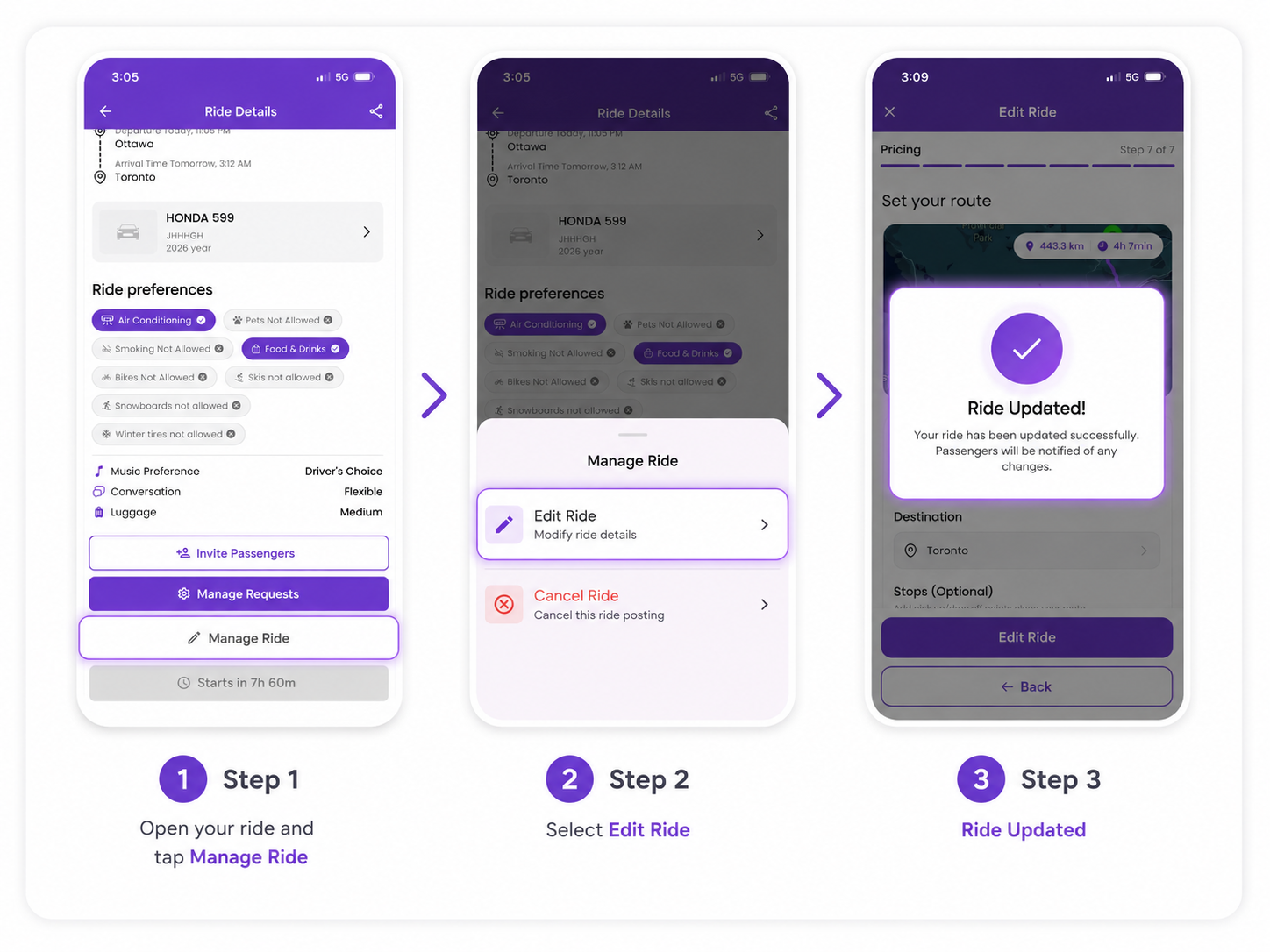
If your travel plans change, you can edit a posted ride directly in WakandaRides as long as no passenger has booked it yet.
1. Open your posted ride
Go to My Rides and select the ride you want to update.
2. Open Manage Ride
Scroll through the ride details and tap Manage Ride.
3. Select Edit Ride
From the Manage Ride menu, select Edit Ride.
You can then review and update the available ride details.
4. Save your changes
Check that your updated information is correct, then tap Edit Ride to save your changes.
Once the update is successful, WakandaRides will display Ride Updated.
If a passenger has already booked
A ride cannot be edited once at least one passenger has a confirmed booking.
This restriction helps protect passengers from unexpected changes to a trip they have already booked, such as changes to the route, departure time, price, or other important ride details.
Good to know
If there are no booked passengers, you can edit your posted ride before departure.
Once at least one passenger has booked, WakandaRides locks ride editing to help avoid disrupting the passenger’s travel plans.