
How to Post a Ride on WakandaRides
Learn how to create and publish a ride on WakandaRides.
If you’re already planning a trip, you can post your available seats on WakandaRides and connect with passengers travelling in the same direction.
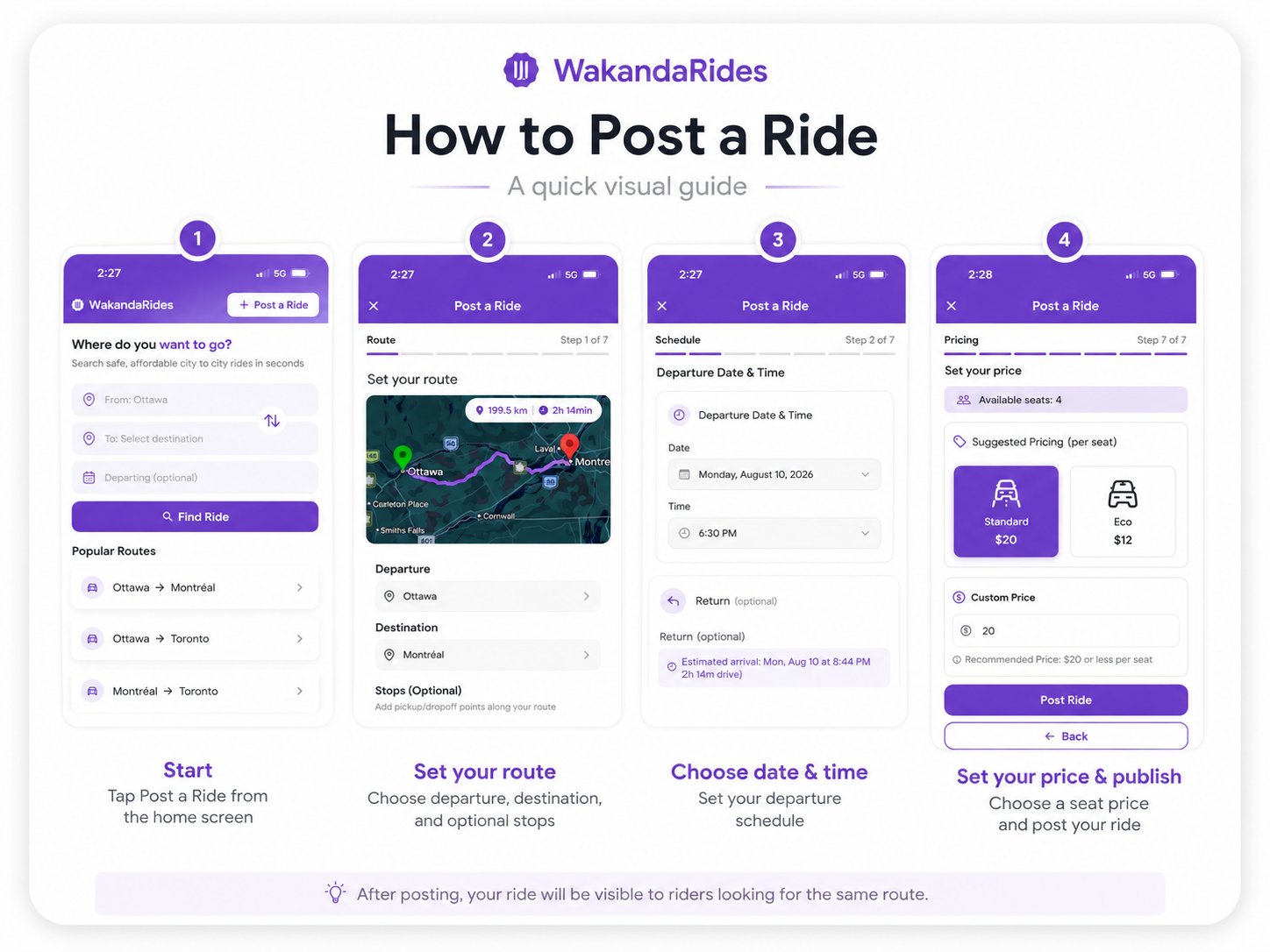
1. Start a new ride
Open WakandaRides and select Post a Ride.
2. Enter your route
Add your:
Departure
Destination
Travel date
Departure time
Make sure the information matches your actual travel plans.
3. Add your ride details
Complete the requested details, including:
Available seats
Price per seat
Vehicle
Optional stops
Pickup details
You can also choose the available booking options for your ride.
4. Review your ride
Before publishing, check your route, date, time, seat price, available seats, and other ride details.
5. Publish your ride
Review your ride details, then tap Post Ride.
Once published, passengers can discover your ride and either book a seat instantly or send a booking request, depending on your ride settings.
Good to know
Before publishing, double-check your departure, destination, date, time, price per seat, available seats, vehicle, and pickup details to make sure everything is accurate.