
How to Cancel a Posted Ride on WakandaRides
Learn how to remove a posted ride you no longer plan to offer.
If you posted a ride that you no longer need, you can remove it from WakandaRides.
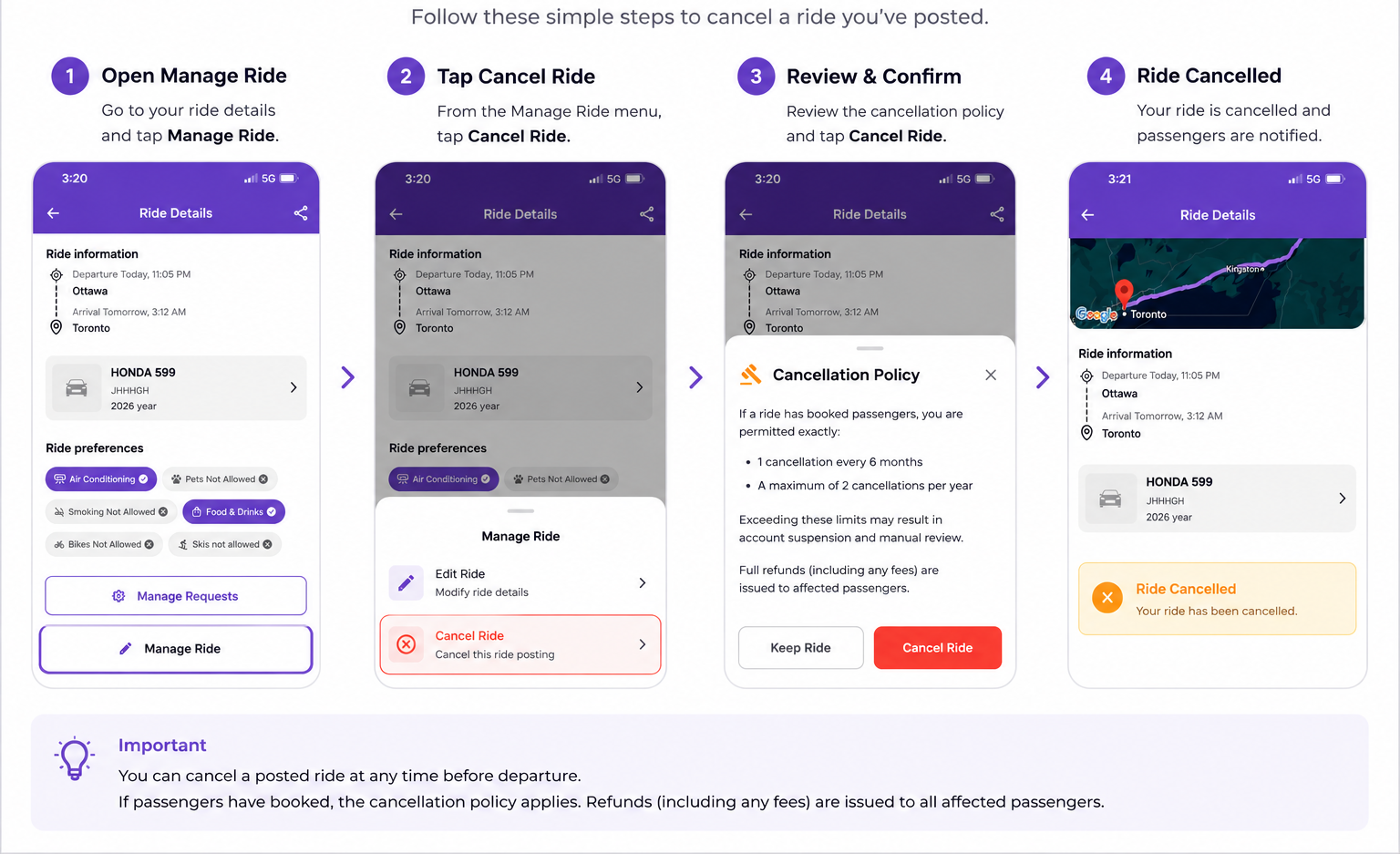
1. Open your ride
Go to My Rides and select the posted ride you want to remove.
2. Open the ride options
From the ride details, select the option to Delete the ride.
3. Review the confirmation
WakandaRides will ask you to confirm before the ride is removed.
Make sure you selected the correct trip.
4. Delete the ride
Confirm the deletion.
Once removed, the ride will no longer be available for new passengers to find or book.
Important
If passengers have already booked the ride, use the appropriate ride cancellation process instead of treating it as an unused ride.
Cancellation rules and passenger refunds may apply.
Good to know
Only remove a ride when you are certain you no longer intend to offer it. If you simply need to change the trip details, use Edit Ride instead.