
How Ride Confirmation and Driver No-Show Reports Work
Learn how to confirm your ride and respond if a driver reports you as absent.
At the end of a ride, WakandaRides asks the driver to confirm passenger attendance and complete the trip.
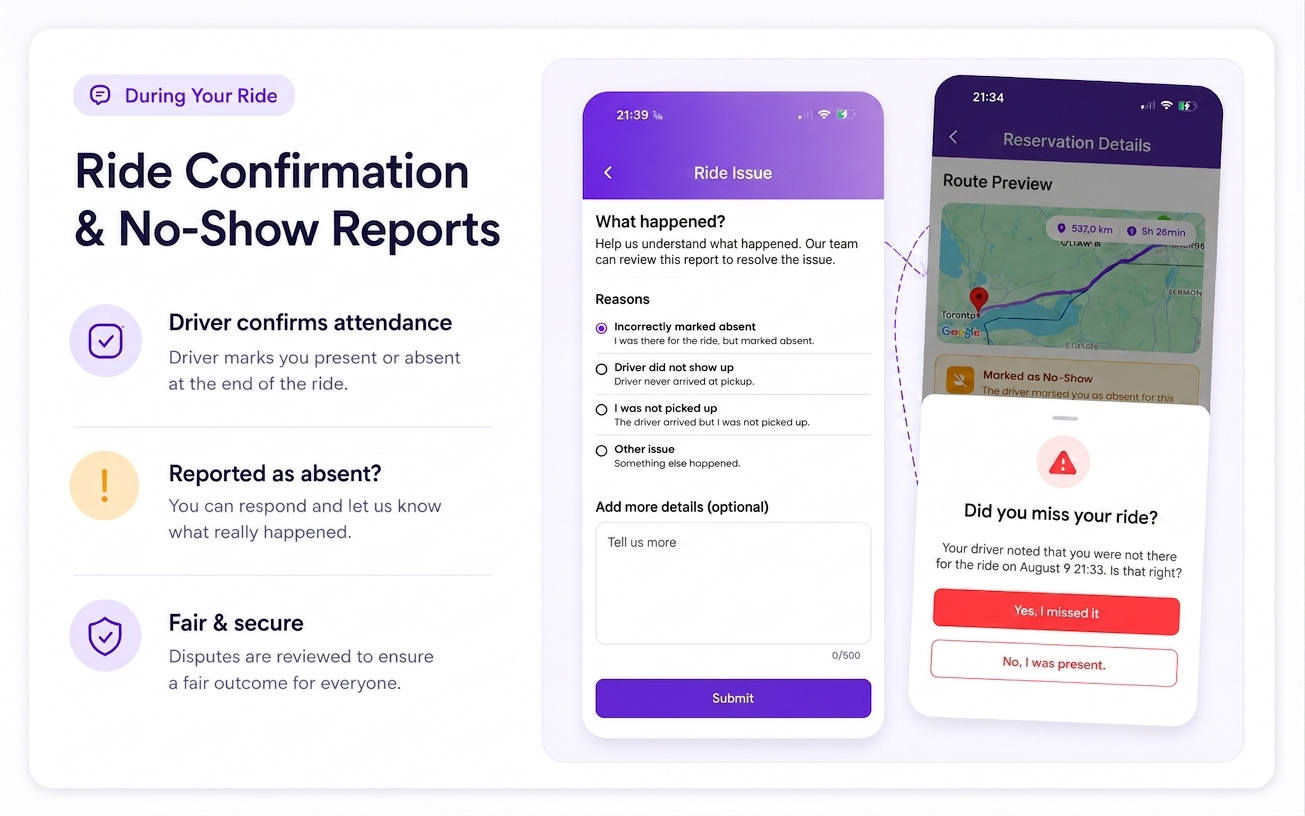
1. The driver completes the ride
When you arrive at the destination, the driver uses Swipe to Complete to finish the ride.
The driver also confirms whether each booked passenger was:
Present
Absent
2. If the driver confirms you were present
If you are marked as present, WakandaRides asks you to confirm that you arrived.
If everything is correct, confirm your arrival in the app.
If you do not respond, the ride can be automatically confirmed after the passenger confirmation period expires.
3. If the driver reports you as a no-show
If the driver marks you as absent, WakandaRides gives you an opportunity to respond.
You can choose:
I did not attend
Choose this if you did not take the ride.
I was there
Choose this if you attended the ride but were incorrectly marked absent.
4. If you select “I was there”
Selecting I was there starts an attendance dispute.
The affected driver payout is placed on hold while WakandaRides reviews the case.
You can follow the dispute status from the affected ride in My Rides.
5. Review the final decision
Once the case is resolved, the ride will show the final outcome.
Depending on the decision, the result may include:
Passenger refunded
Driver payout released
Split resolution
Dispute rejected
Good to know
Always respond accurately to an attendance confirmation. If you were incorrectly reported as a no-show, use I was there so WakandaRides can review the issue before the affected payout is released.